The Idea
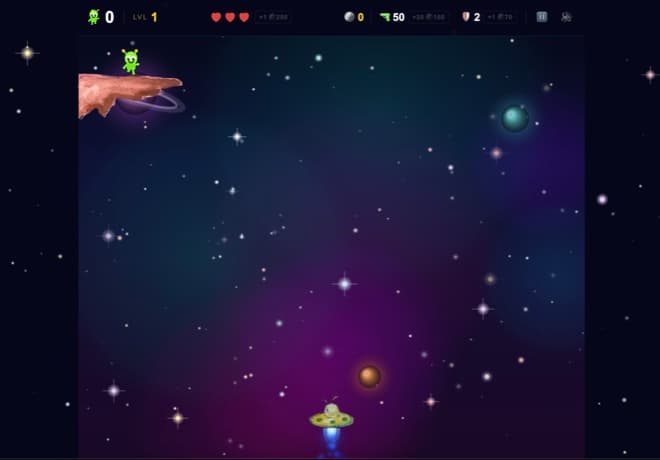
The premise is simple: you fly a spaceship, rocks fall from the sky, and aliens fall with them. Dodge the rocks, catch the aliens. Don't leave them behind.
I'm a web developer, not a game developer. I had dabbled before (some time in Godot, and a while ago some simple kids' puzzle games in Swift) but nothing like a real-time arcade game. And when I started this project I made a decision that shaped everything after it: no game engine this time. Just a <canvas> element, requestAnimationFrame to keep the loop in sync with the display's refresh rate, and JavaScript inside a Next.js app. Partly because I wanted to understand how games actually work under the hood, the part Godot had always handled for me. And partly because pulling a full game engine into a website felt like bringing a truck to a bike race.
This post is about what that journey actually looked like, including the part where the project sat untouched for almost a year, and how AI pair programming changed the second half of it.
Lesson 1: Your First Version Will Be a Prototype, Even if You Don't Call It That
The git history doesn't lie. The first commits are from April 2025: init, space moving, add button, moving spaceship, fixed spaceship move. I got a ship moving, added rocks, made it work on mobile... then the repository sat mostly untouched until spring 2026.
I didn't abandon the project because I lost interest. I abandoned it because the first version was built the way a web developer builds things: DOM elements and CSS, with React state for everything. It worked for a demo, but it was difficult to grow. Every feature I imagined (levels, enemies, particle effects) was difficult to bolt onto that foundation.
What I'd tell past me: that's fine. The prototype wasn't wasted time. It taught me what the game should feel like, so that when I came back, I knew exactly what I was building. The second version is almost always faster to build than the first.
Lesson 2: React Is Great at UI, but the Canvas Owns the Game Loop
When I came back in 2026, the first commit was a full rewrite: “Rewrite game to canvas engine with levels, aliens, and HUD.” The core realization behind it:
React re-renders. Games loop. These are different universes.
A game updates continuously, usually 60 times per second. If every rock, bullet, and particle lives in React state, you end up forcing a UI framework to reconcile and re-render 60 times per second — work that becomes increasingly wasteful the more entities you add. The architecture that finally worked draws a hard line:
- Game state lives in plain
letvariables owned by the game loop, which runs inside a singleuseEffect: ship position, rocks, aliens, bullets, particles. The loop mutates them directly and draws to the canvas. In this setup React doesn't participate in the simulation at all; it only sees the few values I choose to surface. - React state is only for the UI overlay: score, lives, level number, the game-over screen. Things that change a few times per minute, not 60 times per second.
The “engine” itself is small. Every simulation step runs the same sequence: read input, move everything, resolve collisions, spawn whatever the timers say is due, then draw the scene to the canvas in one pass. Each entity type is a plain array of objects, pushed on spawn and filtered out on death. That fixed sequence is the other reason game state stays out of React, beyond performance: a simulation wants one deterministic update order per frame, not a swarm of asynchronous state updates settling whenever React gets around to them.
Lesson 3: Difficulty Is a Math Problem, Not a Vibes Problem
In the prototype, difficulty was hardcoded. In the rewrite, I made it a formula, and this was the single most fun design work in the project.
Every level nudges several dials at once: rock speed climbs by a fixed step per level, alien speed ramps the same way but caps at level 12 so the aliens stay catchable, spawn intervals tighten (down to a hard floor so the game stays possible), and the color palette cycles so each level feels like a new place. Leveling up costs points on a sliding scale. Early levels come fast to hook you; later levels cost more so the endgame feels earned.
Then mechanics unlock by level like chapters in a story: multi-alien spawns at level 2, boss rocks at 10, a ReverseAlien that rises from the bottom at 17, a UFO with a tractor beam that abducts the aliens you're trying to save at 20, a gravity well at 35, a control-scrambling hazard at 37, and at level 50, The Last Egg: an actual win condition. Most arcade games just go forever. I wanted players to be able to finish.
The lesson: once difficulty is parameterized, balancing the game becomes editing numbers instead of rewriting code. Playtest, tweak a constant, playtest again.
Lesson 4: An Economy Changes How Players Feel About Dying
Mid-rewrite, I added coins. Catch aliens, earn coins, spend them mid-game: bullets, a shield, an extra life. Suddenly the game had decisions. Do I save up for a life, or buy a shield now because level 12 is coming?
What surprised me is how much this changed the emotional texture of the game. Before coins, dying was just failure. After coins, dying usually felt like a resource-management mistake — my mistake, one I could fix next run. That tiny shift is the difference between players quitting and players hitting restart. (I also rebalanced the whole economy at least once after watching people play. Your first prices will be wrong. Everyone's are.)
Lesson 5: Mobile Is Not a Smaller Desktop
I thought mobile support meant “make the canvas smaller.” It meant none of that. It meant:
- Touch controls as a React overlay: on-screen buttons for move, shoot, and shield, bridged into the game loop through a ref, with auto-fire on hold.
- Scaling the world, not just the screen: the ship and rocks render at 60% size on touch devices, because thumbs cover the screen and a phone display is small.
- A fixed-timestep game loop. This was the big one. My loop originally ran “once per frame,” which means the game literally runs faster on a 120Hz phone than on a 60Hz monitor. The naive fix is delta-time: multiply movement by the elapsed time since the last frame. That solves the obvious problem of gameplay running faster on high-refresh displays, and for plenty of games it's enough. But the simulation is still being updated at different frequencies on different devices, which can produce subtle differences in physics and collision behavior. The classic solution is the accumulator pattern: simulate in fixed-size steps (1/60th of a second, say) regardless of how often the screen refreshes, running as many simulation steps as needed each frame to catch up before rendering. (Fancier engines go one step further and interpolate between simulation steps so motion stays smooth on high-refresh displays; falling rocks didn't need it.) Every game programming book covers this early. I found out the hard way, like everyone does.
- A pile of mobile-web trivia I never needed before:
100dvhinstead of100vh,viewport-fit=coverand safe-area insets for the iPhone home bar, suppressing long-press context menus and text selection, and the fact that mobile browsers generally won't allow audio playback until the user has interacted with the page.
Lesson 6: Refactor When It Hurts, and It Will Hurt
For a while, the entire game was one ~3,600-line file. It worked, but adding anything meant scrolling through everything. Eventually I split it into modules (constants, entities, drawing, sound) with the loop orchestrating them. The tricky part of refactoring a game, compared with a typical CRUD-style web app, is that everything shares rapidly-changing mutable state. That's normal in a game loop, but it demands real discipline about which module owns what, so carving out modules takes more thought than passing props down a component tree. Solving that taught me more about JavaScript than any tutorial.
I refactored after the game was fun, not before. Premature structure would have slowed down the messy, experimental phase where the game found its personality.
Lesson 7: Finishing Is a Feature
The last stretch wasn't game development at all: SEO and metadata, accessibility passes, a share button, contact and privacy pages, custom error pages. The unglamorous 20% that makes a project a product. I even snuck in a Santa UFO easter egg, because if you can't have fun in your own game, why are you making one?
Lesson 8: AI Pair Programming Changes What's Reachable
I should be honest about how the second half of this project got built: with Claude. The 2026 rewrite (the canvas engine, the level system, the mobile port, the big refactor) was done with Claude Code as a pair programmer, working in conversation rather than alone.
What surprised me is how the domain knowledge showed up exactly when I needed it. I'd describe what I wanted (“the difficulty should ramp but never become impossible”) and we'd turn it into a formula together. When the game ran at double speed on high-refresh phones, I learned about fixed-timestep loops in the middle of fixing the bug. The product direction and design decisions stayed mine; implementation just got much faster.
With the help of Claude's latest model, Fable 5, I converted the whole game to a native Swift mobile game (GitHub). Porting a JavaScript canvas game to Swift means re-thinking the rendering, the input, the audio, the loop.
I don't want to oversell this. AI didn't write the game for me, and the design decisions were all mine. It made the slow parts faster and the unfamiliar parts less intimidating, and I came out understanding both versions of the game, because I was in the conversation the whole time.
Frequently Asked Questions
Do you need a game engine to build a browser game?
No. For a 2D arcade game, an HTML5 canvas element, requestAnimationFrame, and plain JavaScript are enough — that's what AlifallX runs on. A game engine earns its place for 3D, physics-heavy games, multi-platform releases, or projects where editor tooling, asset pipelines, and a mature ecosystem save more time than the engine costs. But for a browser game it can be more machinery than the project needs, and skipping it forces you to learn how game loops, rendering, and input actually work.
Can you build a game with React or Next.js?
Yes, but don't run the game inside React's render cycle. React re-renders; games loop 60 times per second. Keep the simulation state (positions, entities, particles) in plain variables inside a useEffect, draw to a canvas directly, and use React state only for the UI overlay — score, lives, menus — which changes a few times per minute, not 60 times per second.
What is a fixed-timestep game loop and why does it matter?
A loop that runs game logic once per displayed frame makes the game literally run faster on a 120Hz phone than on a 60Hz monitor. Delta-time scaling fixes the speed difference and is enough for many games, but the simulation still updates at different frequencies on different devices, which can produce subtle differences in physics and collision behavior. A fixed-timestep loop uses an accumulator to simulate in fixed-size steps (for example 1/60th of a second), running as many steps per frame as needed to catch up, so the game behaves the same on every display.